
Gateway API 트래픽 제어 – NGINX Gateway Fabric, Istio
Gateway API 트래픽 제어 는 Kubernetes 환경에서 외부 유입 트래픽(North-South)과 내부 서비스 간 트래픽(East-West)을 하나의 표준 API 모델로 통합하는 방법입니다.
기존에는 Ingress Controller와 Service Mesh가 각자의 역할을 나눠 담당하며, 서로 다른 리소스와 문법(Ingress, VirtualService 등)을 사용해 트래픽을 제어해 왔습니다. 이로 인해 운영자는 목적에 따라 상이한 설정 방식과 벤더 종속적인 CRD를 함께 관리해야 하는 복잡성을 안고 있었습니다.
Gateway API는 이러한 문제를 해결하기 위해 등장한 Kubernetes 차세대 네트워크 표준으로, 단순히 Ingress API를 대체하는 수준을 넘어 외부 트래픽과 내부 서비스 간 통신을 동일한 리소스 모델로 정의할 수 있는 기반을 제공합니다.
이번 포스팅에서는 Istio에서 제공하는 Bookinfo 샘플 애플리케이션을 활용하여,
- NGINX Gateway Fabric을 통한 외부 접속 처리(North-South)
- Istio의 GAMMA 구현을 활용한 내부 서비스 라우팅(East-West)
2가지 트래픽을 Gateway API 하나로 통합 제어하는 구성 방법을 알아보겠습니다.
목차
1. Gateway API란?
2. 환경 및 버전 정보
3. Bookinfo 애플리케이션 배포
4. North-South Gateway API 트래픽 제어 (NGINX Gateway Fabric)
5. East-West Gateway API 트래픽 제어 (Istio GAMMA)
6. 결론
1. Gateway API 란?
Kubernetes 네트워크 생태계는 오랫동안 외부 트래픽(North-South)과 내부 트래픽(East-West)을 관리하는 방법이 분리되어 있었습니다.
- North-South:
Ingress리소스를 사용하여 외부 접속을 처리 (예: NGINX Ingress Controller) - East-West:
VirtualService(Istio)와 같은 서비스 메시 전용 CRD를 사용하여 내부 마이크로서비스 통신을 제어
이로 인해 운영자는 목적에 따라 서로 다른 API와 문법을 익혀야 했고, 특정 솔루션의 CRD에 종속되는 문제가 발생했습니다.
Gateway API는 이러한 문제를 해결하기 위해 등장한 Kubernetes의 차세대 네트워크 표준입니다. 단순히 Ingress API를 대체하는 것을 넘어, L4/L7 라우팅을 위한 표현력이 풍부하고 확장 가능한 표준 인터페이스를 제공합니다.
North-South: Ingress를 넘어선 차세대 표준
기존 Ingress 리소스는 단순한 기능(Host/Path 매칭)에 그쳐, 복잡한 라우팅을 위해서는 annotations에 의존해야 했습니다. Gateway API는 이를 Gateway(인프라)와 HTTPRoute(라우팅 규칙)로 분리하여, 더 정교하고 체계적인 외부 트래픽 제어를 가능하게 합니다.
East-West: 서비스 메시 설정의 표준화 (GAMMA)
GAMMA(Gateway API for Mesh Management and Administration) 이니셔티브는 Gateway API 표준을 서비스 메시 영역까지 확장하려는 노력입니다.
기존에는 서비스 메시를 도입하려면 해당 메시 전용 CRD를 새로 배워야 했습니다. 하지만 GAMMA 스펙을 준수하는 메시를 사용하면, 외부 트래픽을 제어하던 HTTPRoute 리소스를 내부 서비스 간 통신 제어에도 그대로 사용할 수 있습니다.
GAMMA를 활용한 East-West 트래픽 제어에 대한 더 자세한 내용은 Gateway API GAMMA 활용 K8S East-West 트래픽 제어 포스트를 참고하세요.
요약: 통합된 트래픽 제어 모델
Gateway API를 사용하면 외부에서 들어오는 트래픽과 내부에서 오가는 트래픽을 하나의 통합된 API 모델로 관리할 수 있습니다.
| 구분 | 기존 방식 | Gateway API 방식 |
| API | Ingress API + Vendor CRD (VirtualService 등) | Gateway API (HTTPRoute) |
| North-South | Ingress Controller | Gateway 리소스에 바인딩 |
| East-West | Service Mesh 전용 설정 | Service 리소스에 바인딩 (GAMMA) |
| 장점 | 익숙하지만 파편화됨 | 일관된 운영 경험, 표준 준수 |
2. 환경/버전 정보
| 구성 요소 | 버전 |
|---|---|
| Kubernetes | v1.32.2 |
| NGINX Gateway Fabric | 2.2.2 |
| Istio | 1.28.1 (minimal) |
| Gateway API | v1.4.1 |
| namespace | devopssong |
3. Bookinfo 애플리케이션 배포
트래픽 제어를 위한 리소스를 배포하기 전에, 테스트 애플리케이션인 Bookinfo 애플리케이션을 배포하겠습니다.
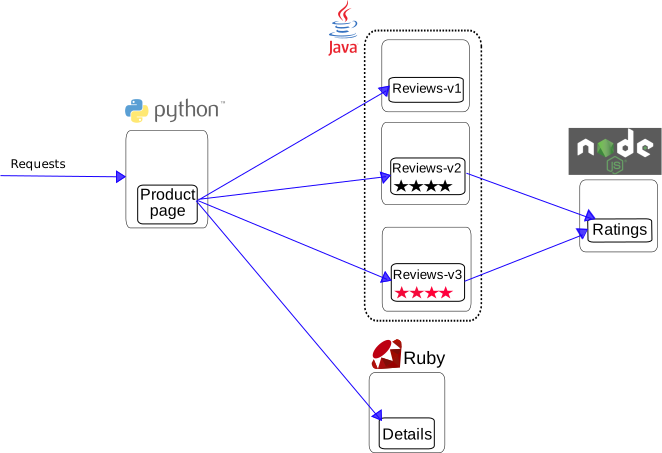
Bookinfo는 온라인 서점의 상세 페이지를 구현한 마이크로서비스 애플리케이션입니다. 각 컴포넌트의 역할은 다음과 같습니다.
- Productpage (Python): 사용자가 접속하는 프론트엔드입니다. 내부적으로 Details와 Reviews 서비스를 호출하여 페이지를 구성합니다.
- Details (Ruby): 책 정보를 담고 있습니다.
- Reviews (Java): 책에 대한 리뷰를 담고 있으며, 3가지 버전이 존재합니다.
- v1: 별점이 없음 (기본)
- v2: 검은색 별점 표시 (Ratings 호출)
- v3: 빨간색 별점 표시 (Ratings 호출)
- Ratings (Node.js): 별점 정보를 제공합니다.
애플리케이션 배포 이전에, GAMMA를 지원하는 Service Mesh 구현체로 Istio minimal 버전을 Kubernetes 클러스터에 구성하고, Pod가 배포될 네임스페이스에 Istio sidecar 컨테이너가 삽입되도록 레이블을 구성했습니다.
Istio를 클러스터에 배포하는 방법은 Istio Service Mesh를 클러스터에 배포하기 포스트를 참고하세요.
$ kubectl get namespaces devopssong --show-labels NAME STATUS AGE LABELSdevopssong Active 277d istio-injection=enabled,kubernetes.io/metadata.name=devopssong
Istio가 제공하는 샘플 애플리케이션인 Bookinfo를 배포합니다.
# Copyright Istio Authors## Licensed under the Apache License, Version 2.0 (the "License");# you may not use this file except in compliance with the License.# You may obtain a copy of the License at## http://www.apache.org/licenses/LICENSE-2.0## Unless required by applicable law or agreed to in writing, software# distributed under the License is distributed on an "AS IS" BASIS,# WITHOUT WARRANTIES OR CONDITIONS OF ANY KIND, either express or implied.# See the License for the specific language governing permissions and# limitations under the License.################################################################################################### This file defines the services, service accounts, and deployments for the Bookinfo sample.## To apply all 4 Bookinfo services, their corresponding service accounts, and deployments:## kubectl apply -f samples/bookinfo/platform/kube/bookinfo.yaml## Alternatively, you can deploy any resource separately:## kubectl apply -f samples/bookinfo/platform/kube/bookinfo.yaml -l service=reviews # reviews Service# kubectl apply -f samples/bookinfo/platform/kube/bookinfo.yaml -l account=reviews # reviews ServiceAccount# kubectl apply -f samples/bookinfo/platform/kube/bookinfo.yaml -l app=reviews,version=v3 # reviews-v3 Deployment##################################################################################################################################################################################################### Details service##################################################################################################apiVersion: v1kind: Servicemetadata: name: details labels: app: details service: detailsspec: ports: - port: 9080 name: http selector: app: details---apiVersion: v1kind: ServiceAccountmetadata: name: bookinfo-details labels: account: details---apiVersion: apps/v1kind: Deploymentmetadata: name: details-v1 labels: app: details version: v1spec: replicas: 1 selector: matchLabels: app: details version: v1 template: metadata: labels: app: details version: v1 spec: serviceAccountName: bookinfo-details containers: - name: details image: docker.io/istio/examples-bookinfo-details-v1:1.20.3 imagePullPolicy: IfNotPresent ports: - containerPort: 9080---################################################################################################### Ratings service##################################################################################################apiVersion: v1kind: Servicemetadata: name: ratings labels: app: ratings service: ratingsspec: ports: - port: 9080 name: http selector: app: ratings---apiVersion: v1kind: ServiceAccountmetadata: name: bookinfo-ratings labels: account: ratings---apiVersion: apps/v1kind: Deploymentmetadata: name: ratings-v1 labels: app: ratings version: v1spec: replicas: 1 selector: matchLabels: app: ratings version: v1 template: metadata: labels: app: ratings version: v1 spec: serviceAccountName: bookinfo-ratings containers: - name: ratings image: docker.io/istio/examples-bookinfo-ratings-v1:1.20.3 imagePullPolicy: IfNotPresent ports: - containerPort: 9080---################################################################################################### Reviews service##################################################################################################apiVersion: v1kind: Servicemetadata: name: reviews labels: app: reviews service: reviewsspec: ports: - port: 9080 name: http selector: app: reviews---apiVersion: v1kind: ServiceAccountmetadata: name: bookinfo-reviews labels: account: reviews---apiVersion: apps/v1kind: Deploymentmetadata: name: reviews-v1 labels: app: reviews version: v1spec: replicas: 1 selector: matchLabels: app: reviews version: v1 template: metadata: labels: app: reviews version: v1 spec: serviceAccountName: bookinfo-reviews containers: - name: reviews image: docker.io/istio/examples-bookinfo-reviews-v1:1.20.3 imagePullPolicy: IfNotPresent env: - name: LOG_DIR value: "/tmp/logs" ports: - containerPort: 9080 volumeMounts: - name: tmp mountPath: /tmp - name: wlp-output mountPath: /opt/ibm/wlp/output volumes: - name: wlp-output emptyDir: {} - name: tmp emptyDir: {}---apiVersion: apps/v1kind: Deploymentmetadata: name: reviews-v2 labels: app: reviews version: v2spec: replicas: 1 selector: matchLabels: app: reviews version: v2 template: metadata: labels: app: reviews version: v2 spec: serviceAccountName: bookinfo-reviews containers: - name: reviews image: docker.io/istio/examples-bookinfo-reviews-v2:1.20.3 imagePullPolicy: IfNotPresent env: - name: LOG_DIR value: "/tmp/logs" ports: - containerPort: 9080 volumeMounts: - name: tmp mountPath: /tmp - name: wlp-output mountPath: /opt/ibm/wlp/output volumes: - name: wlp-output emptyDir: {} - name: tmp emptyDir: {}---apiVersion: apps/v1kind: Deploymentmetadata: name: reviews-v3 labels: app: reviews version: v3spec: replicas: 1 selector: matchLabels: app: reviews version: v3 template: metadata: labels: app: reviews version: v3 spec: serviceAccountName: bookinfo-reviews containers: - name: reviews image: docker.io/istio/examples-bookinfo-reviews-v3:1.20.3 imagePullPolicy: IfNotPresent env: - name: LOG_DIR value: "/tmp/logs" ports: - containerPort: 9080 volumeMounts: - name: tmp mountPath: /tmp - name: wlp-output mountPath: /opt/ibm/wlp/output volumes: - name: wlp-output emptyDir: {} - name: tmp emptyDir: {}---################################################################################################### Productpage services##################################################################################################apiVersion: v1kind: Servicemetadata: name: productpage labels: app: productpage service: productpagespec: ports: - port: 9080 name: http selector: app: productpage---apiVersion: v1kind: ServiceAccountmetadata: name: bookinfo-productpage labels: account: productpage---apiVersion: apps/v1kind: Deploymentmetadata: name: productpage-v1 labels: app: productpage version: v1spec: replicas: 1 selector: matchLabels: app: productpage version: v1 template: metadata: annotations: prometheus.io/scrape: "true" prometheus.io/port: "9080" prometheus.io/path: "/metrics" labels: app: productpage version: v1 spec: serviceAccountName: bookinfo-productpage containers: - name: productpage image: docker.io/istio/examples-bookinfo-productpage-v1:1.20.3 imagePullPolicy: IfNotPresent ports: - containerPort: 9080 volumeMounts: - name: tmp mountPath: /tmp volumes: - name: tmp emptyDir: {}---
$ kubectl apply -f bookinfo.yaml -n devopssongservice/details createdserviceaccount/bookinfo-details createddeployment.apps/details-v1 createdservice/ratings createdserviceaccount/bookinfo-ratings createddeployment.apps/ratings-v1 createdservice/reviews createdserviceaccount/bookinfo-reviews createddeployment.apps/reviews-v1 createddeployment.apps/reviews-v2 createddeployment.apps/reviews-v3 createdservice/productpage createdserviceaccount/bookinfo-productpage createddeployment.apps/productpage-v1 created
배포된 pod와 service를 다음과 같이 확인할 수 있습니다.
reviews service의 endpoint는 reviews pod의 버전(v1/v2/v3)과 무관하게, 3개 버전의 pod를 모두 포함하는 것을 확인할 수 있습니다.
$ kubectl get po -n devopssongNAME READY STATUS RESTARTS AGEdetails-v1-766844796b-4nzpt 2/2 Running 0 43sproductpage-v1-54bb874995-2cds2 2/2 Running 0 42sratings-v1-5dc79b6bcd-9xch6 2/2 Running 0 43sreviews-v1-598b896c9d-jh4vg 2/2 Running 0 43sreviews-v2-556d6457d-7k6zg 2/2 Running 0 43sreviews-v3-564544b4d6-qhbbn 2/2 Running 0 42s$ kubectl get svc -n devopssongNAME TYPE CLUSTER-IP EXTERNAL-IP PORT(S) AGEdetails ClusterIP 10.108.151.163 <none> 9080/TCP 35sproductpage ClusterIP 10.101.223.228 <none> 9080/TCP 33sratings ClusterIP 10.101.85.71 <none> 9080/TCP 34sreviews ClusterIP 10.100.236.15 <none> 9080/TCP $ kubectl get endpoints reviews -n devopssongNAME ENDPOINTS AGEreviews 10.0.134.104:9080,10.0.134.154:9080,10.0.14.60:9080 2m13s
다음 명령어를 사용하여 배포한 애플리케이션의 동작 여부를 확인할 수 있습니다.
$ kubectl exec "$(kubectl get pod -l app=ratings -o jsonpath='{.items[0].metadata.name}')" -c ratings -- curl -sS productpage:9080/productpage | grep -o "<title>.*</title><title>Simple Bookstore App</title>
4. North-South Gateway API 트래픽 제어 (NGINX Gateway Fabric)
외부에서 클러스터 내부의 productpage로 접속하기 위한 Gateway와 HTTPRoute를 배포합니다. 이 단계는 NGINX Gateway Fabric이 처리합니다.
트래픽을 수신할 Gateway 리소스를 생성합니다. gatewayClassName: nginx를 지정하여 NGINX Gateway Fabric이 이 리소스를 관리하도록 합니다.
bookinfo-gateway.yaml
apiVersion: gateway.networking.k8s.io/v1kind: Gatewaymetadata: name: bookinfo-gatewayspec: gatewayClassName: nginx listeners: - name: http port: 80 protocol: HTTP allowedRoutes: namespaces: from: Same
해당 Gateway는 80번 포트로 HTTP 프로토콜 요청을 수신하며, 동일 네임스페이스에 배포된 Route 리소스와 연결을 허용합니다.
$ kubectl apply -f bookinfo-gateway.yaml -n devopssonggateway.gateway.networking.k8s.io/bookinfo-gateway created$ kubectl get gateway NAME CLASS ADDRESS PROGRAMMED AGEbookinfo-gateway nginx 192.168.40.95 True 7s
Gateway는 트래픽을 수신하는 진입점이기 때문에, 해당 리소스가 배포되면 배포된 네임스페이스에 트래픽을 수신/처리하는 NGINX pod와, service가 자동으로 배포됩니다.
service는 기본적으로 LoadBalancer 타입으로 배포되며, NGINX Gateway Fabric 설정에 따라 달라질 수 있습니다.
$ kubectl get po -n devopssongNAME READY STATUS RESTARTS AGEbookinfo-gateway-nginx-678f7b5cb-v6kss 2/2 Running 0 102s...$ kubectl get svc -n devopssongNAME TYPE CLUSTER-IP EXTERNAL-IP PORT(S) AGEbookinfo-gateway-nginx LoadBalancer 10.105.146.185 192.168.40.95 80:31784/TCP 105s...
HTTPRoute 리소스를 배포하여 외부 요청을 productpage service로 전달하는 라우팅 규칙을 정의합니다.
bookinfo-route.yaml
apiVersion: gateway.networking.k8s.io/v1kind: HTTPRoutemetadata: name: bookinfo-ingress namespace: devopssongspec: parentRefs: - name: bookinfo-route kind: Gateway # North-South: Gateway 리소스에 바인딩 rules: - matches: - path: type: PathPrefix value: /productpage - path: type: PathPrefix value: /static - path: type: PathPrefix value: /login - path: type: PathPrefix value: /logout - path: type: PathPrefix value: /api/v1/products backendRefs: - name: productpage port: 9080
$ kubectl apply -f bookinfo-route.yaml -n devopssonghttproute.gateway.networking.k8s.io/bookinfo-route created$ kubectl get httproutes.gateway.networking.k8s.io -n devopssongNAME HOSTNAMES AGEbookinfo-route 9s
Gateway 리소스로 생성된 service의 external IP와, HTTPRoute 리소스에 정의된 경로(/productpage)로 요청을 전송하여 접속을 확인합니다.
$ kubectl get svc -n devopssongNAME TYPE CLUSTER-IP EXTERNAL-IP PORT(S) AGEbookinfo-gateway-nginx LoadBalancer 10.105.146.185 192.168.40.95 80:31784/TCP 105s$ curl -I 192.168.40.95/productpageHTTP/1.1 200 OKserver: istio-envoydate: Tue, 30 Dec 2025 06:22:57 GMTcontent-type: text/html; charset=utf-8content-length: 9429vary: Cookiex-envoy-upstream-service-time: 215x-envoy-decorator-operation: bookinfo-gateway-nginx.devopssong.svc.cluster.local:80/*

5. East-West Gateway API 트래픽 제어 (Istio GAMMA)
이제 내부 서비스 간 통신(productpage → reviews)을 제어해 보겠습니다. 이 단계는 Istio(Service Mesh)가 처리합니다.
현재 reviews 서비스는 v1, v2, v3 버전의 pod들을 모두 엔드포인트로 가지고 있습니다. 이로 인해 productpage가 reviews를 호출할 때마다 Kubernetes 기본 service 동작 방식으로 3개 버전의 파드에 트래픽이 무작위로 분산되고 있습니다.
이 동작을 Gateway API(HTTPRoute)를 사용하여 가중치 기반 트래픽 분산으로 트래픽을 제어해 보겠습니다.
먼저 reviews Pod의 버전별 Service 리소스를 클러스터에 배포합니다.
selector에 version 레이블을 명시하여 해당하는 버전의 pod로만 트래픽을 전달합니다.
review-services.yaml
apiVersion: v1kind: Servicemetadata: name: reviews-v1 labels: app: reviews service: reviews version: v1spec: ports: - port: 9080 name: http selector: app: reviews version: v1--- apiVersion: v1kind: Servicemetadata: name: reviews-v2 labels: app: reviews service: reviews version: v2spec: ports: - port: 9080 name: http selector: app: reviews version: v2--- apiVersion: v1kind: Servicemetadata: name: reviews-v3 labels: app: reviews service: reviews version: v3spec: ports: - port: 9080 name: http selector: app: reviews version: v3
$ kubectl apply -f review-services.yaml -n devopssongservice/reviews-v1 createdservice/reviews-v2 createdservice/reviews-v3 created
준비된 서비스를 활용해 라우팅 규칙을 정의하는 HTTPRoute 리소스를 배포합니다.
parentRefs에 정의된 reviews service로 향하는 트래픽을, rules에 정의된 가중치에 따라 각 버전별 service로 분산합니다.
review-route.yaml
apiVersion: gateway.networking.k8s.io/v1kind: HTTPRoutemetadata: name: reviews-routespec: parentRefs: - name: reviews kind: Service # East-West: Service에 바인딩하여 내부 트래픽 제어 (GAMMA) group: "" port: 9080 rules: - backendRefs: - name: reviews-v1 port: 9080 weight: 10 - name: reviews-v2 port: 9080 weight: 60 - name: reviews-v3 port: 9080 weight: 30
$ kubectl apply -f review-route.yaml httproute.gateway.networking.k8s.io/reviews-route created
이제 productpage가 reviews 서비스를 호출할 때, HTTPRoute에 정의된 가중치(10:60:30)에 따라 트래픽이 분산됩니다.

웹 브라우저 접속 화면에서 Book Reveiws에서 응답을 받은 버전을 확인할 수 있습니다.
- v1: 별점이 없음
- v2: 검은색 별점 표시
- v3: 빨간색 별점 표시
또한 Reviews served by 뒤의 Pod 이름을 확인하여 어떤 버전의 Pod로 트래픽이 전달되었는지 확인할 수 있습니다.
터미널에서 반복문을 사용하여 100회의 요청을 전송하고, 응답한 reviews 버전의 비율을 확인해 보겠습니다.
$ for i in {1..100}; do curl -s "http://192.168.40.95/productpage" | grep -o "reviews-v[1-3]" | head -n 1; done | sort | uniq -c

가중치 기반 분산의 특성상 정확히 10:60:30 비율로 떨어지지는 않지만, 반복 요청 시 설정한 가중치 비율에 근접하게 트래픽이 분산되는 것을 확인할 수 있습니다.
6. 결론
이번 포스팅에서는 Gateway API 트래픽 제어를 주제로, 외부 유입부터 내부 통신까지 하나의 표준 API로 통합 제어하는 방법을 알아봤습니다.
Gateway API를 통해 전용 CRD(VirtualService 등)없이, 오직 표준 리소스인 HTTPRoute 하나만으로 다음과 같은 핵심 가치를 확인했습니다.
- 단일 표준 API:
HTTPRoute라는 하나의 리소스 문법으로 Ingress(NGINX Gateway Fabric)와 Service Mesh(Istio)를 모두 제어하여 운영 복잡도를 획기적으로 낮췄습니다. - 명확한 역할 분리:
- Gateway 바인딩: 외부 트래픽 제어 (North-South)
- Service 바인딩 (GAMMA): 내부 트래픽 제어 (East-West)
- 벤더 중립성 및 호환성: 특정 솔루션에 종속되지 않는 표준 아키텍처를 구현함으로써, 인프라의 유연성과 지속 가능성을 확보했습니다.
Gateway API는 표준이지만, 사용하려는 구현체(Controller)에 따라 지원하는 리소스와 기능 범위가 상이할 수 있음에 유의해야 합니다. 모든 구현체가 Gateway API의 모든 스펙을 100% 지원하는 것은 아니며, 기능에 따라 Core, Extended, Implementation-specific 단계로 나뉘어 있습니다. 따라서 프로덕션 환경에 도입하기 전, 사용하려는 솔루션(NGINX, Istio, Cilium 등)의 공식 호환성을 반드시 확인하고 검증하는 절차가 필요합니다.
운영 중인 클러스터의 트래픽을 Gateway API를 사용하여 통합 관리할 계획이신가요? NGINX STORE를 통해 문의하여 Istio 및 NGINX Gateway Fabric 도입을 상담하세요.


댓글을 달려면 로그인해야 합니다.